ABOUT US

Our development agency is committed to providing you the best service.

OUR TEAM

We MindCoral Team peopleare here for online elearning service

  • Bipin Chapagain

    Founder

    UX/UI and Creative Graphic Designer.

  • Pradeep

    Programmer

    Programming andIncluding other Tech Education.

  • Bip Lop

    Web Developer

    Web Developingand Web Designingconcepts of html css js php jquery and many more

OUR SKILLS

We pride ourselves with strong, flexible and top notch skills.

Graphic Design

Design 90%
UX/UI 80%
LOGOS 70%

Websites

Dynamic 90%
Responsive 80%
Simple 70%

Programming

Beginner 90%
Advance 80%
Professional 70%

ACHIEVEMENTS

We help our clients integrate, analyze, and use their data to improve their business.

150

GREAT PROJECTS

300

HAPPY CLIENTS

650

COFFEES DRUNK

1568

FACEBOOK LIKES

STRATEGY & CREATIVITY


COURSES

We pride ourselves on bringing a fresh perspective and effective marketing to each project.

  • PHP Introduction


    What is PHP?

    • PHP is an acronym for "PHP: Hypertext Preprocessor"
    • PHP is a widely-used, open source scripting language
    • PHP scripts are executed on the server
    • PHP is free to download and use
    PHP is an amazing and popular language!

    It is powerful enough to be at the core of the biggest blogging system on the web (WordPress)!
    It is deep enough to run the largest social network (Facebook)!
    It is also easy enough to be a beginner's first server side language!


    What is a PHP File?

    • PHP files can contain text, HTML, CSS, JavaScript, and PHP code
    • PHP code are executed on the server, and the result is returned to the browser as plain HTML
    • PHP files have extension ".php"

    What Can PHP Do?

    • PHP can generate dynamic page content
    • PHP can create, open, read, write, delete, and close files on the server
    • PHP can collect form data
    • PHP can send and receive cookies
    • PHP can add, delete, modify data in your database
    • PHP can be used to control user-access
    • PHP can encrypt data
    With PHP you are not limited to output HTML. You can output images, PDF files, and even Flash movies. You can also output any text, such as XHTML and XML.

    Why PHP?

    • PHP runs on various platforms (Windows, Linux, Unix, Mac OS X, etc.)
    • PHP is compatible with almost all servers used today (Apache, IIS, etc.)
    • PHP supports a wide range of databases
    • PHP is free. Download it from the official PHP resource: www.php.net
    • PHP is easy to learn and runs efficiently on the server side
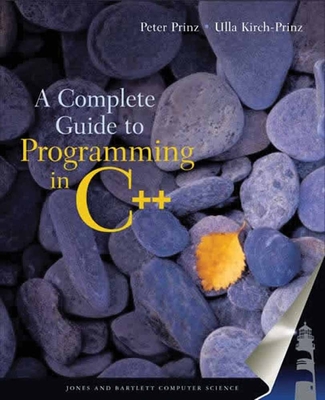
  • A Complete Guide to Programming in C++

    This book was written for readers interested in learning the C++ programming language from scratch, and for both novice and advanced C++ programmers wishing to enhance their knowledge of C++. It was our goal from the beginning to design this text with the capabilities of serving dual markets, as a textbook for students and as a holistic reference manual for professionals. The C++ language definition is based on the American National Standards Institute ANSI Standard X3J16. This standard also complies with ISO norm 14882, which was ratified by the International Standardization Organization in 1998. The C++ programming language is thus platform-independent in the main with a majority of C++ compilers providing ANSI support. New elements of the C++ language, such as exception handling and templates, are supported by most of the major compilers. Visit the Jones and Bartlett web site at www.jbpub.com for a listing of compilers available for this text. The chapters in this book are organized to guide the reader from elementary language concepts to professional software development, with in-depth coverage of all the C++ language elements en route. The order in which these elements are discussed reflects our goal of helping the reader to create useful programs at every step of the way.


  • The Site Development Process


    In This Chapter 
    The standard steps in the web design process: 
    Conceptualization and research 
    Content organization and creation
     Art direction 
    Prototype building 
    Testing 
    Site launch 
    Maintenance

  • Learn HTML & CSS

    Traditionally, you’ll see books that teach HTML first and then CSS, keeping the two languages completely separate. But when they’re taught independently, things don’t really come together until the very end, which is frustrating for someone new to HTML and CSS. I wanted to take a different approach, teaching both languages at the same time so that you can see the fruits of your labor sooner rather than later. This book aims to bring instant gratification to the web design process. It was also important to me that the book be project based, providing a completed website for readers who work through the book from start to finish. Not everyone learns by reading alone, so I wanted to provide a tangible website to allow people to learn experientially. And let’s face it, HTML and CSS can be a little daunting at first. After all, the languages are ever changing, and the evolution requires a steady stream of up-to-date material. This book is written in a workshop-style format, with 12 easy-to-digest lessons. Starting with the basics, each lesson builds upon the previous one and breaks down the barriers to entry, showing you how you can start writing HTML and CSS today in practical examples. In fact, you build a simple web page in the first lesson. Then, in subsequent lessons, you learn not only how to make this web page more robust, but also how to create additional designsavvy and interactive web pages that, when combined, form an entire functional website. Learn to Code HTML & CSS covers the latest technologies as well as the foundations of HTML and CSS that were set years ago. It also covers a range of topics and skills, from beginning to advanced. So if you’re looking to become a web designer or developer and you want to learn HTML and CSS, then this book is for you.


  • Calculator in HTML and Javascript


    <html>
    <h3>Calculator made by Pradeep</h3>
    <style>
     body
    {
    background-color:tan;
    }
    .box
    {
    background-color:#3d4543;
    height:300px;
    width:250px;
    border-radius:10px;
    position:relative;
    top:80px;
    left:40%;
    }
    .display
    {
    background-color:#222;
    width:220px;
    position:relative;
    left:15px;
    top:20px;
    height:40px;
    }
    .display input
    {
    position:relative;
    left:2px;
    top:2px;
    height:35px;
    color:black;
    background-color:#bccd95;
    font-size:21px;
    text-align:right;
    }
    .keys
    {
    position:relative;
    top:15px;
    }
    .button
    {
    width:40px;
    height:30px;
    border:none;
    border-radius:8px;
    margin-left:17px;
    cursor:pointer;
    border-top:2px solid transparent;
    }
    .button.gray
    {
    color:white;
    background-color:#6f6f6f;
    border-bottom:black 2px solid;
    border-top:2px #6f6f6f solid;
    }
    .button.pink
    {
    color:black;
    background-color:#ff4561;
    border-bottom:black 2px solid;
    }
    .button.black
    {
    color:white;
    background-color:303030;
    border-bottom:black 2px solid;
    border-top:2px 303030 solid;
    }
    .button.orange
    {
    color:black;
    background-color:FF9933;
    border-bottom:black 2px solid;
    border-top:2px FF9933 solid;
    }
    .gray:active
    {
    border-top:black 2px solid;
    border-bottom:2px #6f6f6f solid;
    }
    .pink:active
    {
    border-top:black 2px solid;
    border-bottom:#ff4561 2px solid;
    }
    .black:active
    {
    border-top:black 2px solid;
    border-bottom:#303030 2px solid;
    }
    .orange:active
    {
    border-top:black 2px solid;
    border-bottom:FF9933 2px solid;
    }
    p
    {
    line-height:10px;
    }
    </style>
    <div class="box">
    <div class="display"><input type="text" readonly size="15" id="d"></div>
    <div class="keys">
       
        <input type="button" class="button pink"

        value="/" onclick='v("/")'></p>
        <p><input type="button" class="button black"

        value="7" onclick='v("7")'><input type="button"

        class="button black" value="8" onclick='v("8")'>
        <input type="button" class="button black" value="9"

        onclick='v("9")'><input type="button"

        class="button pink" value="*" onclick='v("*")'></p>
        <p><input type="button" class="button black"

        value="4" onclick='v("4")'><input type="button"

        class="button black" value="5" onclick='v("5")'>
        <input type="button" class="button black" value="6"

        onclick='v("6")'><input type="button"

        class="button pink" value="-" onclick='v("-")'></p>
        <p><input type="button" class="button black"

        value="1" onclick='v("1")'><input type="button"

        class="button black" value="2" onclick='v("2")'>
        <input type="button" class="button black" value="3"

        onclick='v("3")'><input type="button"

        class="button pink" value="+" onclick='v("+")'></p>
        <p><input type="button" class="button black"

        value="0" onclick='v("0")'><input type="button"

        class="button black" value="." onclick='v(".")'>
        <input type="button" class="button black" value="C"

        onclick='c("")'><input type="button"

        class="button orange" value="=" onclick='e()'></p>
    </div>
    </div>
    <script>
    function c(val)
    {
    document.getElementById("d").value=val;
    }
    function v(val)
    {
    document.getElementById("d").value+=val;
    }
    function e()
    {
    try
    {
      c(eval(document.getElementById("d").value))
    }
    catch(e)
    {
      c('Error')
    }
    }
    </script>
    </html>
    Your Calculator is ready now.
  • SYS NEPAL MOCKUP DESIGN


    PHP Introduction

      What is PHP? PHP is an acronym for "PHP: Hypertext Preprocessor" PHP is a widely-used, open source scripting language ...

    WHAT WE DO

    We're with you on Designing, Developing as well as providingElearning Courses for clients.

    CONTACT US

    For enquiries you can contact us in several different ways. Contact details are below.

    Mind Coral

    • Street :Itahari-4, Aaitabare
    • Person :Bipin Xettry
    • Phone :+977-9811017093
    • Country :NEPAL
    • Email :mindcoral40@gmail.com

    Welcome to Elearning Blog Mindcoral

    e-Learning exploits interactive technologies and communication systems to improve the learning experience. It has the potential to transform the way we teach and learn across the board. It can raise standards, and widen participation in lifelong learning. It cannot replace teachers and lecturers, but alongside existing methods it can enhance the quality and reach of their teaching, and reduce the time spent on administration. It can enable every learner to achieve his or her potential, and help to build an educational workforce empowered to change. It makes possible a truly ambitious education system for a future learning society.'